Waitlist open

What AI did for code,
we're doing for things.

Mimo takes your idea from first sketch to manufactured product. One conversation. Every step.

The earlier you join, the sooner you get in.

Explore
The workspace

Everything happens here.

Chat with Mimo while your model renders, analysis runs, and pricing updates live. No tab juggling. No file exports. One unified workspace.

Mimo
phone-holder-v1.glb 82 × 64 × 45mm
Print Configuration
Material
PETG
Color
Black
Layer Height
0.20mm Standard
Infill
15% Gyroid
Make It Mimo suggests
$1.20 · 52 min · Bambu H2D
Order It
$14.00 · 5-7 business days
New Chat
online
Design me a phone holder for my desk with a cable slot in the back.
Interpreting Request, Generating Concepts
Design Concepts
Minimal
Angular
Organic
Floating
All optimized for FDM — no supports needed
4 concepts. B has the cleanest geometry — single piece, steepest angle under 40°.
B looks good, build it.
Generating Model
3D Model Generated
phone-holder-v1.glb ready
Model generated. Want to verify it prints on your H2D in PETG?
Yes, let's verify it.
Identifying Part, Running Analysis
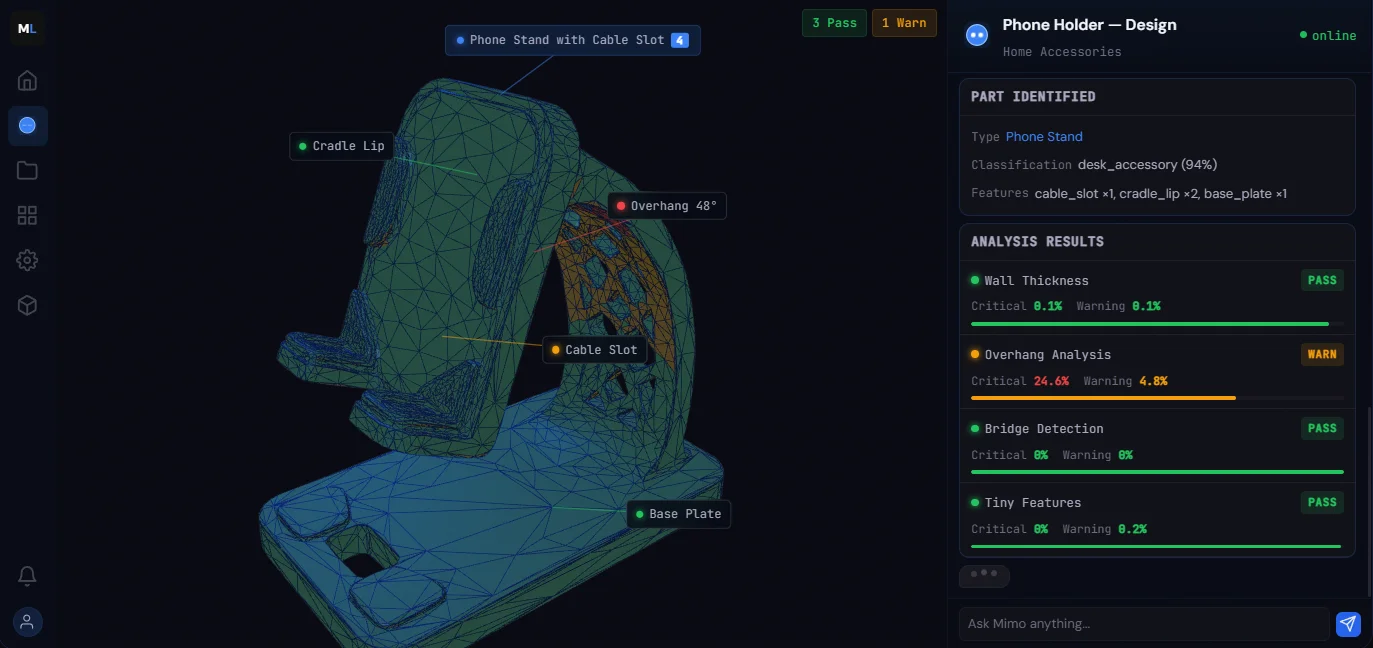
Part Identified
TypePhone Stand
Classificationdesk_accessory (94%)
Featurescable_slot ×1, cradle_lip ×2, base_plate ×1
Analysis Results
Wall ThicknessPass
Critical 0.1%Warning 0.1%
Overhang AnalysisWarn
Critical 24.6%Warning 4.8%
Bridge DetectionPass
Critical 0%Warning 0%
Tiny FeaturesPass
Critical 0%Warning 0.2%
One overhang on the cable slot lip — 48°. A 15° rotation clears it.
Optimizing Orientation
Proposed Orientation
X: 15° — Overhangs: -100%
Re-running Analysis
Analysis Results (v2)
Wall ThicknessPassmin 1.6mm
OverhangsPassmax 32°
BridgesPassno spans
Tiny FeaturesPassmin 0.8mm
All clear. Zero supports needed. Ready to configure?
Configure it.
Configuring Model
PETG, 0.2mm, 15% gyroid on your H2D. 52 minutes, $1.20 in material.
Export it.
Generating G-code
Export
phone-holder-v1.3mf
BambuStudio-ready .3mf with your PETG profile.

From idea to print-ready
in one conversation.

The earlier you join, the sooner you get in.

Ask Mimo anything...
Mimo — Phone Holder v1
Mimo desktop workspace showing 3D model viewer, print configuration, and AI chat
Tap to expand

The full workspace — desktop

The platform

Many things to make.
Mimo finds the way.

For everyone who makes

One platform.
Your workflow.

For developers

Mimo from your terminal.

CLI, REST API, and MCP server. Give your code manufacturing intelligence.

mimo — zsh CLI
~/projects/drone-mount $ mimo
Mimo CLI v0.9.0
200+ tools · Mimo Pro
~/projects/drone-mount
> analyze the stl in ./parts
  and export for my H2D in PETG
▸ read_file ./parts/drone-mount.stl
▸ run_analysis wall, overhang, bridge
  wall PASS · overhang WARN · bridge PASS
▸ configure_model PETG, H2D
▸ export ./out/drone-mount.3mf
Done. 52 min, $1.20 material.
200+ tools | Context: 12%
api.mimolabs.ai REST
{ "id": "msg_01a7Xk...", "model": "mimo-1", "content": [ { "type": "analysis", "passed": 4, "warnings": 1 }, { "type": "model_output", "format": "glb", "url": "https://api..." }, { "type": "text", "text": "4/5 passed..." } ], "stop_reason": "end_turn", "usage": { "in": 3847, "out": 1205 } }
claude_desktop_config.json MCP
{ "mcpServers": { "mimo": { "command": "mimo", "args": ["mcp-server"], "env": { "MIMO_API_KEY": "ml_live_..." } } } }
run_analysis configure_model generate_3d_model get_partner_pricing +196 tools

The vision

Manufacturing shouldn't require a manufacturing degree.

You can describe software to an AI and watch it appear. You should be able to describe a physical object and hold it in your hands. We're building the bridge between those two realities.

Waitlist open private alpha launching soon

Join the waitlist.
Earn your spot.

Join now for earlier access and founding member perks.

The earlier you join, the sooner you get in.